Active Record
The theory behind Active Record in Ruby on Rails and how it connects models to the database.
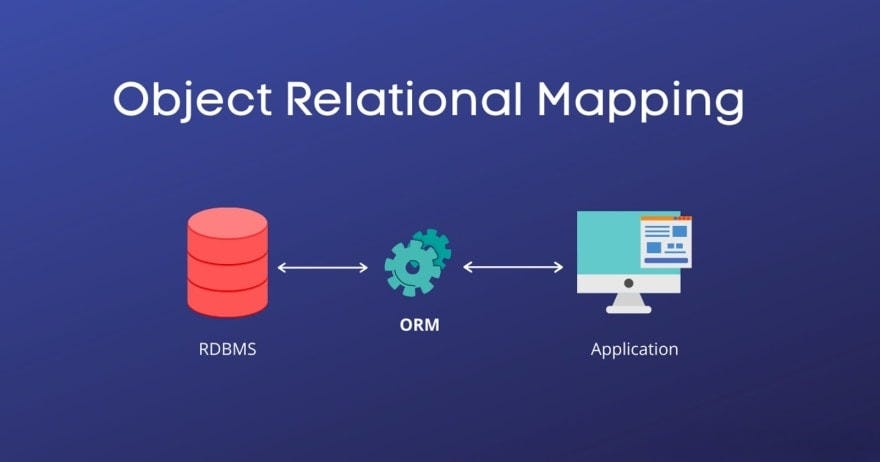
Active Record in Ruby on Rails is a design pattern that makes it easy for the application to interact with the database. It’s part of Rails’ MVC (Model-View-Controller) architecture and serves as an abstraction layer for data access. Here are the main concepts and features of Active Record:
1. Models as data representation
- Each model class in Rails represents a table in the database. For example, a
Userclass represents theuserstable. - The class’s attributes correspond to the table’s columns.
2. Simplified CRUD
- Active Record provides methods to perform CRUD (Create, Read, Update, Delete) operations in a simple, intuitive way:
     - **Create**: `User.create(name: "John Doe")`
     - **Read**: `User.find(1)` or `User.where(active: true)`
     - **Update**: `user.update(name: "Jane Doe")`
     - **Delete**: `user.destroy`
3. Associations
- Active Record lets you define relationships between models, such as
belongs_to,has_many, andhas_one. These associations make it easy to retrieve related data. - Example:
     class Post < ApplicationRecord
       belongs_to :user
     end

     class User < ApplicationRecord
       has_many :posts
     end
4. Validations
- Active Record lets you add validations to ensure data meets certain criteria before it’s saved to the database.
- Example:
     class User < ApplicationRecord
       validates :email, presence: true, uniqueness: true
     end
5. Callbacks
- Active Record lets you define methods that run at specific points in the model’s lifecycle, such as before or after creating, updating, or destroying records.
- Example:
     class User < ApplicationRecord
       before_save :capitalize_name

       private

       def capitalize_name
         self.name = name.capitalize
       end
     end
6. Migrations
- Migrations are scripts that help you change the database schema in a controlled way. Active Record provides a migration system that makes it easy to create and alter tables.
- Example:
     class CreateUsers < ActiveRecord::Migration[6.0]
       def change
         create_table :users do |t|
           t.string :name
           t.string :email
           t.timestamps
         end
       end
     end
7. Scopes
- Scopes are methods that let you define reusable queries that can be chained.
- Example:
     class User < ApplicationRecord
       scope :active, -> { where(active: true) }
     end
Scopes are an Active Record feature in Ruby on Rails that let you define reusable, readable queries in a simple and effective way. They’re used to encapsulate filtering logic, making the code more organized and easier to understand.
Advantages of scopes
- Code reuse: if you need to repeat a specific query several times in your code, a scope encapsulates that logic so you don’t have to write the same query over and over.
- Query composition: scopes can be chained, letting you compose complex queries from several smaller ones.
- Readability: using scopes makes the code more readable, especially in large projects.
Defining scopes
Scopes are defined in the model (app/models/) and have the following basic structure:
class ModelName < ApplicationRecord
  scope :name_of_scope, -> { where(condition) }
end
A scope is defined with scope :name, -> { query }, where :name is the scope’s name and query is the condition that defines the query.
Basic example
Suppose we have a User model with active and created_at attributes. Here are some examples of scopes for this model:
class User < ApplicationRecord
  # Scope to find active users
  scope :active, -> { where(active: true) }

  # Scope to find users created in the last month
  scope :created_last_month, -> { where('created_at >= ?', 1.month.ago) }

  # Scope to find users with a specific email
  scope :with_email, ->(email) { where(email: email) }
end
How to use scopes
Once the scopes are defined in the model, you can use them in queries. Here are some usage examples:
- To list all active users:
User.active
- To find users created in the last month:
User.created_last_month
- To find users with a specific email:
User.with_email('example@example.com')
- Chaining scopes: You can combine several scopes, which results in more powerful queries:
User.active.created_last_month
In this example, Rails generates a query that finds active users who were also created in the last month.
Dynamic scopes
A scope can take parameters to make the query more flexible. For example, we can create a scope that filters users created more than n days ago:
class User < ApplicationRecord
  # Dynamic scope with a parameter
  scope :created_more_than, ->(days) { where('created_at <= ?', days.days.ago) }
end
Now we can use it by passing a value as an argument:
User.created_more_than(30)This would return all users created more than 30 days ago.
Best practices
-
Use lambdas (
->): always define scopes with lambdas so they’re evaluated at execution time, not when the code is defined. This avoids problems with queries that use dynamic variables or depend on current data. -
Chain scopes: take advantage of scope chaining to build more refined queries progressively, keeping each scope simple and direct.
-
Avoid complex logic: if the query needs a lot of conditional logic, consider whether a class method would be more appropriate, since scopes are meant to keep queries simple and reusable.
Class methods vs. scopes
Although scopes are convenient, class methods can also be used when you need more complex queries or when the logic isn’t easily expressed with Active Record:
class User < ApplicationRecord
  def self.created_last_week
    where('created_at >= ? AND created_at <= ?', 1.week.ago.beginning_of_week, 1.week.ago.end_of_week)
  end
end
If the conditional logic is very large, a class method may be more appropriate than a scope.
Scopes with ordering and limits
Scopes can also include ordering and limits:
class Post < ApplicationRecord
  # Scope that returns the 5 most recent posts
  scope :recent, -> { order(created_at: :desc).limit(5) }
end
Now we can call Post.recent to get the 5 most recent posts.
Scopes in Active Record are an efficient way to encapsulate common, reusable queries in Rails. They make the code more organized and readable while allowing flexible, powerful queries. When the logic is more complex, class methods can complement scopes.
8. SQL integration
- Although Active Record provides an abstraction, it still lets developers write SQL queries when needed, using the
find_by_sqlmethod or passing SQL statements directly.
Active Record’s integration with SQL in Ruby on Rails provides an abstraction layer that lets you perform database operations simply, using Ruby methods. However, Active Record also provides ways to work directly with SQL when you need more complex or specific queries.
Here are some details on how this integration works:
1. Basic queries with Active Record
Active Record lets you run common SQL operations (SELECT, INSERT, UPDATE, DELETE) transparently. Some examples:
- SELECT (reading data):
User.where(active: true) # SELECT * FROM users WHERE active = true;
- INSERT (inserting data):
  User.create(name: 'John Doe', email: 'john@example.com')
  # INSERT INTO users (name, email) VALUES ('John Doe', 'john@example.com');
- UPDATE (updating data):
  user = User.find(1)
  user.update(name: 'Jane Doe')
  # UPDATE users SET name = 'Jane Doe' WHERE id = 1;
- DELETE (removing data):
  user = User.find(1)
  user.destroy
  # DELETE FROM users WHERE id = 1;
2. Custom SQL queries with Active Record
Although Active Record lets you query using Ruby methods, sometimes you may need a more complex or custom SQL query. Active Record lets you run raw SQL directly:
find_by_sql: runs full SQL queries and returns objects of the corresponding model.
User.find_by_sql("SELECT * FROM users WHERE active = true AND created_at >= '#{1.month.ago}'")
This runs the SQL query and returns a collection of User objects.
connection.execute: runs SQL queries that don’t return model objects, such as DDL (Data Definition Language) statements that create or alter tables.
ActiveRecord::Base.connection.execute("DELETE FROM users WHERE last_login IS NULL")
This example runs a DELETE query directly against the database.
3. Raw SQL with where and order
You can use raw SQL inside Active Record methods such as where and order when you need more flexibility.
wherewith raw SQL:
User.where("created_at >= ?", 1.week.ago)
Here, Active Record allows SQL in the where method, replacing ? with the given value (1.week.ago) and automatically protecting against SQL injection.
orderwith raw SQL:
User.order("LENGTH(name) DESC")
In this case, we use a SQL function (LENGTH) to sort users by name length.
4. Joins and associations with SQL
Active Record also makes table joins easy, but when needed, you can write SQL to join tables directly.
joinswith Active Record:
User.joins(:posts).where(posts: { published: true })
This generates a SQL query with an INNER JOIN between the users and posts tables.
- Custom SQL in
joins:
User.joins("INNER JOIN posts ON posts.user_id = users.id AND posts.published = true")
You can write a more specific SQL JOIN by passing a SQL string directly.
5. Running direct data-manipulation SQL
If you need to create or modify the database directly (for example, in scripts or migrations), you can run SQL directly through the Active Record connection.
- Creating tables:
  ActiveRecord::Base.connection.execute("
    CREATE TABLE archived_users AS
    SELECT * FROM users WHERE active = false
  ")
This command runs SQL to create a new archived_users table, copying data from users.
6. Transactions with SQL
Active Record makes it easy to use transactions, which ensure a series of SQL operations runs atomically (either all succeed or none are applied).
- Using transactions:
  ActiveRecord::Base.transaction do
    user = User.create!(name: 'John Doe')
    Payment.create!(user: user, amount: 100)
  end
If any of the operations fails (for example, Payment.create! raises an exception), Active Record rolls back the transaction, ensuring no data is inserted or changed.
7. Scopes and SQL
You can combine custom SQL inside Active Record scopes to create reusable, flexible queries.
- Example scope with SQL:
  class User < ApplicationRecord
    scope :recent, -> { where("created_at >= ?", 1.month.ago) }
    scope :active, -> { where(active: true) }
  end

  # Chaining scopes
  User.recent.active
This code combines a scope that returns recent users with another that returns only active users, using raw SQL inside the scope.
8. Safe from SQL injection
Rails automatically protects against SQL injection when substituting values in methods such as where or find_by. For example:
User.where("email = ?", params[:email])Here, Rails properly escapes and formats the value of params[:email], preventing malicious commands from being executed.
9. Complex queries with Arel
For more complex queries, you can use Arel, the library behind Active Record that generates SQL. It lets you build more powerful dynamic queries while keeping them safe and readable.
- Basic Arel example:
  users = User.arel_table
  query = users.project(users[:id], users[:name])
                .where(users[:active].eq(true))
  ActiveRecord::Base.connection.execute(query.to_sql)
With Arel, you get more control over building SQL queries directly in Ruby, without losing the abstraction Active Record provides.
Wrapping up the integration
Active Record’s SQL integration is highly flexible and lets you work with high-level abstractions for most database operations. When needed, you can also write custom or direct SQL queries, giving you full control over more complex and specific queries without giving up protection against SQL injection.
9. Convention over configuration
- Active Record follows the “convention over configuration” philosophy, which means it works automatically based on predefined conventions (such as table and column names), minimizing the need for extra configuration.
In Ruby on Rails, the “Convention over Configuration” (CoC) principle is one of the core philosophies that makes the framework so popular and efficient. It’s based on the idea that if the developer follows Rails’ established conventions, there’s no need to specify many configuration details, because Rails already knows how to interpret the code and its intentions. This reduces the number of decisions the developer has to make, resulting in higher productivity and cleaner, more standardized code.
How does “Convention over Configuration” work in Rails?
Instead of requiring the developer to explicitly configure every aspect of an application, Rails adopts a set of predefined standards and conventions. If you follow those conventions, Rails automatically takes care of many things behind the scenes. If you need to deviate from them, you can configure things manually, but Rails assumes most cases will use the defaults.
Here are the main examples of how Rails applies Convention over Configuration:
1. File and folder naming
Rails follows a strict convention for where files should live and how they should be named. By following these conventions, Rails can automatically load and associate classes, models, controllers, and other components without extra configuration.
Example:
- Models live in
app/models. - Controllers live in
app/controllers. - View files live in
app/views.
If you have a controller called UsersController, Rails automatically expects that:
- The controller file is called
users_controller.rb. - The file is located in
app/controllers/. - The associated model is
User(singular). - The model is in
app/models/user.rb.
This convention simplifies the workflow because Rails already knows where to look for classes and files.
2. Model and table naming
In Rails, models are named in the singular, while the associated database tables are named in the plural. This convention removes the need to explicitly configure the table name in a model, unless you want to deviate from it.
Example:
- A model called
Usermaps, by default, to a table calledusers. - A model called
ProductCategorymaps, by default, to a table calledproduct_categories.
If you want to use a different table name, you can configure it manually in the model:
class User < ApplicationRecord
  self.table_name = "my_custom_table"
end
3. Routing conventions
Rails uses conventions when creating RESTful (Representational State Transfer) routes for resources. When you define a resource in config/routes.rb, Rails automatically creates the CRUD (Create, Read, Update, Delete) routes for that resource.
Example:
Adding a line to config/routes.rb:
resources :usersRails automatically creates the following routes:
| HTTP verb | URL | Controller#Action |
|---|---|---|
| GET | /users | users#index |
| GET | /users/:id | users#show |
| POST | /users | users#create |
| PATCH/PUT | /users/:id | users#update |
| DELETE | /users/:id | users#destroy |
| GET | /users/new | users#new |
| GET | /users/:id/edit | users#edit |
These routes are generated automatically following RESTful conventions, without the developer having to define each route manually.
4. Connecting models to the database
By convention, a model’s table fields should follow predefined naming so Rails knows how to work with them. For example, Rails already expects fields such as:
id: the primary key field (generated automatically).created_atandupdated_at: timestamp fields (generated automatically).user_id: a foreign key field to associate with theUsermodel.
By using conventions like these, Rails can automatically set up associations (has_many, belongs_to), create timestamps, and manage primary and foreign keys without extra configuration.
Example:
If you create a posts table with a user_id column, Rails already knows user_id is the foreign key that associates a Post with the User model. So you can create an association in the Post model:
class Post < ApplicationRecord
  belongs_to :user
end
Rails automatically links user_id to the relationship with the User model.
5. Conventions for views and layouts
Rails follows conventions to organize views inside the app/views folder, based on controller names. When you create a controller called UsersController, Rails expects the views associated with that controller to be in app/views/users.
Example:
If you have an index action in UsersController, Rails expects to find the corresponding view file at app/views/users/index.html.erb.
Rails also follows conventions for layouts. If you have a default layout called application.html.erb in app/views/layouts/, Rails automatically applies that layout to every page unless a different layout is specified.
6. Conventions for migrations
Migrations in Rails follow conventions for generating database changes. Rails generates migration files named after the task they perform, and it uses table and column names based on model names.
Example:
When you run:
rails generate migration AddAgeToUsers age:integerRails generates a migration called AddAgeToUsers, and the migration file automatically includes the instruction to add an age column of type integer to the users table.
This convention makes migrations easy to understand, since the file name directly reflects what the migration does.
7. Conventions for emails and mailers
When you generate a mailer in Rails, it follows conventions for both the directory structure and the email template names.
Example:
When you create a mailer called UserMailer with a welcome_email action, Rails expects the corresponding template to be at:
app/views/user_mailer/welcome_email.html.erbAnd it expects the UserMailer class to contain a method called welcome_email.
8. Testing conventions
Rails also enforces conventions for how tests are organized. Model tests live in test/models, controller tests in test/controllers, and so on. Rails also expects test files to match their respective models, controllers, or features.
Example:
If you have a model called User, Rails expects to find its test file at test/models/user_test.rb.
Benefits of convention over configuration
- Productivity: Rails removes the need to manually configure many aspects of the application, letting the developer focus more on business logic.
- Easier maintenance: by following conventions, Rails code is easier to read and maintain, since any developer familiar with Rails can understand the application’s structure and flow without extensive documentation.
- Fewer errors: by following predefined patterns, the risk of introducing configuration errors is minimized.
When to customize?
Although Rails’ conventions cover most cases, there are situations where you may need to customize the behavior. Fortunately, Rails is flexible enough to let you change the conventions when needed through manual configuration.
Customization example:
class User < ApplicationRecord
  self.table_name = "people"
end
The Convention over Configuration principle in Rails makes development faster, more organized, and easier to understand. By sticking to Rails’ conventions, you reduce the need for explicit configuration and get the most out of the framework. When needed, though, Rails allows custom configuration for specific scenarios without compromising flexibility.
Active Record is a powerful tool that simplifies Ruby on Rails development by enabling easy, intuitive interaction with the database, promoting an organized structure and supporting agile development.